> For the complete documentation index, see [llms.txt](https://hotro.voip24h.vn/llms.txt). Markdown versions of documentation pages are available by appending `.md` to page URLs; this page is available as [Markdown](https://hotro.voip24h.vn/huong-dan-softphone/he-dieu-hanh-android/phan-mem-buss-call/huong-dan-cai-dat-phan-mem-buss-call.md).
# Hướng dẫn cài đặt phần mềm BUSS CALL
Tham khảo video hướng dẫn
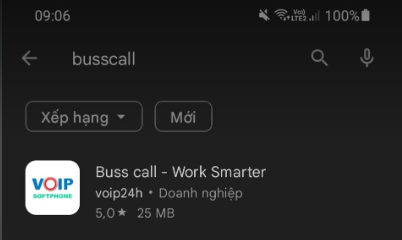
Vào CH Play  và tìm kiếm từ khoá "BussCall" như hình bên dưới hoặc truy cập đường dẫn để tảt ứng dụng về
Sau khi tải xong mở app BUSSCALL lên và điền thông tin do Voip24h cung cấp

Sau khi mở app thì cấp quyền theo yêu cầu từ app


Sau khi điền xong lưu ý nhớ cho phép hết mọi yêu cầu từ app

và tìm kiếm từ khoá "BussCall" như hình bên dưới hoặc truy cập đường dẫn để tảt ứng dụng về
Sau khi tải xong mở app BUSSCALL lên và điền thông tin do Voip24h cung cấp

Sau khi mở app thì cấp quyền theo yêu cầu từ app


Sau khi điền xong lưu ý nhớ cho phép hết mọi yêu cầu từ app